A WordPress Plugin Conflict Debugging Checklist We Actually Use
The standard forum advice — deactivate every plugin, then turn them back on one by one — is the slowest…
A brief landed with us the week GPT-6 Astra shipped: a furniture brand wanted 3D models of about two hundred SKUs for their configurator, and someone on their side had watched a demo of Astra building a scene in Blender. The question was reasonable and the answer was not the one they expected. What Astra does in Blender is genuinely impressive, and it is almost certainly not the thing that solves a two-hundred-SKU catalog problem.
The confusion is worth unpicking, because it comes from a real ambiguity in the phrase “AI 3D generation.” There are two completely different techniques hiding under it, they fail in different ways, and picking the wrong one costs you a pipeline rebuild.
This is the part that gets lost. GPT-6 Astra, which OpenAI released as a limited preview on 3 September 2026 and opened to paid accounts the following day, does not emit geometry. It cannot hand you a mesh. What it does is write Python — specifically bpy, Blender’s embedded scripting API — and then run Blender.
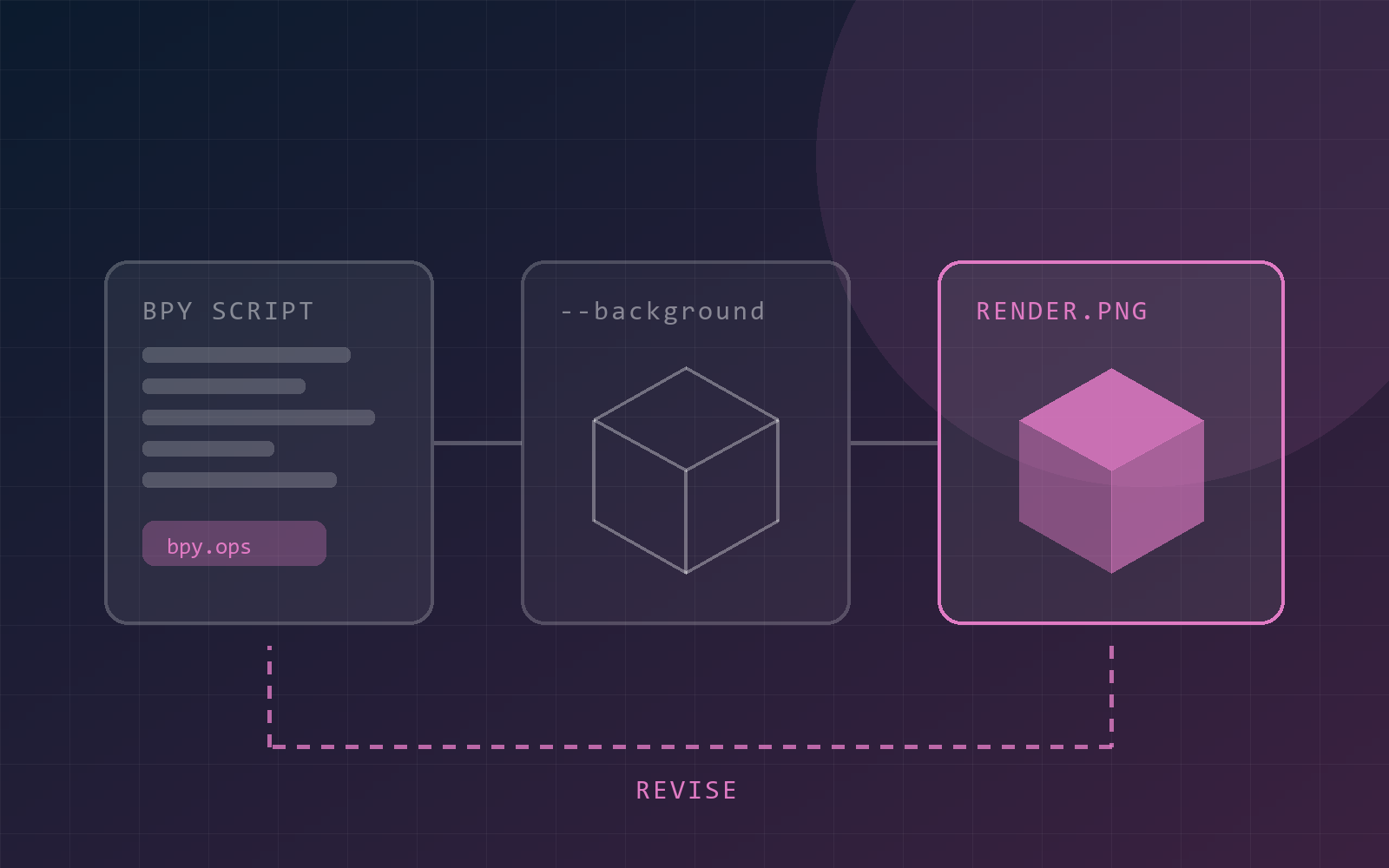
The loop is unglamorous and it is the whole trick:
brief → write a bpy script → run it headless → render a frame
      → look at the PNG → revise the script → run it again
Concretely, the model shells out to something like blender --background --python scene.py, Blender executes the script with no window open, a render call writes an image to disk, and the model reads that image back as its next input. It compares the render against the brief, decides what is wrong, and rewrites the script.
So the model is not doing the modelling. Blender is doing the modelling. The model is writing and reviewing, which happens to be exactly what a language model is good at, and it is a very different proposition from a system that outputs a mesh directly.
The alternative approach — call it native 3D generation — is what most people picture. A model trained on geometry takes a prompt or a photograph and emits finished mesh data with PBR materials in one pass. Tools in this category will produce an untextured base mesh in roughly ninety seconds and a textured one in a couple of minutes, exported as .glb, .fbx or .obj, ready to drop into a pipeline.
Agentic control of Blender is the other road, and it inverts every property:
That last point is the real distinction. Native generation gives you an asset. Agentic control gives you a scene file with structure in it, which is a different kind of artifact and worth different money.
The model can only see what it renders.
That sentence is the whole risk surface. Astra’s feedback signal is a rasterised image from one camera position. If the camera is pointed the wrong way, or the interesting failure is behind the object, or the problem is inverted normals that happen to look fine under the current lighting, the model sees a plausible render and concludes it is finished. Geometry can be badly wrong in ways a single view will never reveal — non-manifold edges, flipped faces, overlapping verts, a modifier stack that looks right at the current viewport subdivision and shatters at render subdivision.
A human 3D artist orbits the model. The agent, by default, does not. If you build this into a pipeline, budget for multiple camera angles per check and a wireframe or normals pass, and treat any single-view approval as unverified.
The other limits are more mundane. Anything that needs C or C++ inside Blender is out of reach, because bpy is the surface it has. Organic forms — characters, cloth, anything sculpted rather than constructed — are far weaker than hard-surface and architectural work, which is unsurprising given the technique: it is easier to write a script that places a staircase than one that shapes a face. And nobody has good public evidence yet on how this behaves against a genuinely large production file rather than a demo scene.
There is a second way to drive Blender: computer use, where the agent looks at the actual application window and operates the interface with mouse and keyboard. Astra is genuinely strong at this — OpenAI’s pitch leans heavily on computer use and browsing, and its reported BenchCAD figure for 3D reconstruction with tools, 95.9% against 83.3% for GPT-5.6 Sol, comes from that family of capability.
For production work we would still reach for bpy first, because the failure modes of GUI automation are environmental rather than logical:
None of those are intelligence problems, which is what makes them irritating — they are the kind of thing that works in a demo and fails on a Tuesday afternoon because someone locked their screen. The script path runs headless on a build machine, which is where this belongs anyway.
Computer use earns its place for the parts of Blender with no clean scripting surface, and for exploratory work where a person wants to watch and intervene. It is a supervision tool more than an automation tool.
Two hundred SKUs of similar objects is a throughput problem, and agentic scene control is the wrong shape for throughput. Every item would be its own multi-minute, multi-render conversation with an unbounded iteration count, supervised by someone who can tell a good mesh from a bad one. That is not two hundred cheap generations. That is two hundred small projects.
The split we would actually scope:
bpy genuinely pays. Room sets, lighting rigs, camera arrays, colourway permutations across an existing catalogue: all of it is scripted repetition against clean input assets, and all of it produces an editable file a human can take over.The pattern generalises past 3D, and it is the same one we keep arriving at with automation work: the interesting capability is rarely the one in the demo video. Astra operating Blender is a genuine step change in what an agent can do with a desktop application, and the correct response to it is not to point it at your highest-volume task. It is to find the work that is currently manual, structured, and repetitive — and to keep a human on the render review, because the model only sees what it renders.
The cheapest useful experiment is a single scene you already have, a script the agent writes and revises, and a token log open beside it. Instrument the cost before you commit it to a client timeline — the number of self-correction loops is the variable that matters, and it is not knowable in advance. Run it headless, render at least two camera angles per check, and diff the .blend rather than trusting the picture.
We are running this against real scene files at the moment rather than demo prompts, and we will write up what breaks. If you are weighing 3D automation into a product or a catalogue pipeline and want a second opinion on which road fits, that is a conversation we are happy to have.
Tell us what you're building and we'll tell you honestly whether we're a fit.
The standard forum advice — deactivate every plugin, then turn them back on one by one — is the slowest…
Almost every brief grows the word "AI" somewhere in it, and hardly any of them say what that means. These…
Self-hosted n8n is easy to stand up and easy to neglect once it's quietly running a client's order pipeline. Here's…